Purpose
Role Assistants meet people where daily work already happens: conversation through an approved AI interface. In ChatGPT, Claude, Copilot, Teams, Slack, or similar channels, an identified person states a business objective in their own words. The platform turns that objective into governed work using the active Business Role, permitted business context, and the controls required for the task.
Conversation is the usual starting point and return point. There is no separate chat mode and task mode. Governed work runs under the conversation; people see answers, pending questions, approvals, and results — not an alternate product skin.
The interface can change. The governed business capability remains with the enterprise. Conversation is not a shortcut around governance: the same Operational Trust controls apply whether a request begins in a channel or, when needed, in the AI Fabrix interface. In Work Hub, selecting Continue on a New task calls the identical governed work-start operation that external AI clients such as ChatGPT and Copilot use — the same path, not a separate planner.
What this shows: The ideal operating pattern: a person states a business goal to an AI interface; the interface submits it in the active role; AI Fabrix returns a governed result, question, or completed outcome. ChatGPT, Claude, Copilot, Teams, and Slack are examples of that interface.
What this is not: The AI interface calling enterprise systems directly, a prompt workflow, or a substitute for Ask and Approval rules.
Configure next: Assistant channels · Install ChatGPT channel · Install Claude channel
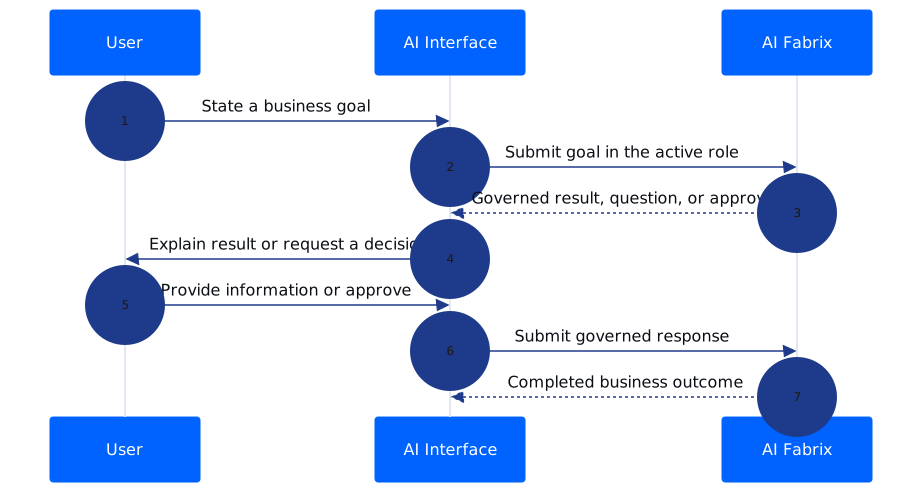
Interaction levels (where work appears)
| Level | What the person does | Preferred place |
|---|---|---|
| Conversation | Ask, answer, explain, summarize, recommend | Teams, Slack, Copilot, ChatGPT |
| Micro-task | Ask for information, approve or reject a proposal | Same conversation (inline cards) |
| Rich review | Compare several records, resolve conflicts, edit structured information | Temporary Review Workspace in Work |
| Administration | Trust status, connectors, operator evidence | Admin / Assistants views — not the daily home |
Review Workspace (rare, temporary)
Work is not the default daily destination and not the operational home. It opens only when rich review is required — comparing related records, resolving a conflict, reviewing structured information, or considering a proposed change that conversation cards cannot present safely.
The Review Workspace is that temporary rich-review view. After the decision, the person returns to the conversation that started the work.
When should Work open?

Only when the person needs richer review than conversation can provide — comparing related information, resolving a conflict, or inspecting structured proposed changes for one business objective.
Simple Ask and Approval tasks should stay in the conversation. See Human tasks, approvals, and Why.
Assistants support operators
Assistants list and detail views support operators who need to understand trust, evidence, and execution history across Role Assistants. They are not end-user chrome or an alternative daily workspace. End users begin with their business objective; operators use Assistants when they need proof, status, or a deeper review of how governed work performed.
For the evidence created by completed work, see Business value from work steps. For channel choices and responsibilities, see Assistant channels.
Example
A sales leader asks their Sales Assistant to prepare a pipeline review. The Assistant gathers trusted context and presents the proposed work in the conversation. If several accounts require comparison and a proposed update needs a rich decision, the leader opens the Review Workspace from a deep link, reviews the information, responds, and returns to the conversation. The completed steps provide evidence of what happened and what value was created.
Business value
Conversation-first work keeps AI assistance close to the employee’s daily work while reserving a temporary place for decisions that need rich review. It avoids turning every request into navigation, keeps administrative controls separate from end-user work, and makes evidence available when the organization needs to understand an outcome.
Limits
Available channels, rich-review features, and activity detail can vary by deployment. Work does not replace a channel as the normal home for everyday conversation, and Assistants views may expose different operator evidence depending on enabled services.